
Installing ArduCopter Software (Mission Planner and Arducopter Firmware)

1. Download and Install Mission Planner
Go to the Arducopter Downloads page here. and download the latest version of the Mission planner installer. It will be called APMPlanner.msi, download the 32, or 64 bit version depending on which windows you are using.
|

|
|
Once you have downloaded the installer, run it and follow the on screen instructions.
Please note that the mission planner installer will also install all of the system drivers required by arducopter, if any warning messages appear, please select "Install this driver software anyway" button |

|
2. Connect ArduPilot to your computer and open Mission Planner
Once the install has completed, you can now plug in your ArduPilot Mega board to your computer. Wait a few moments while windows recognised and installes the drivers for the board.
Dont connect your APM board via a USB HUB |
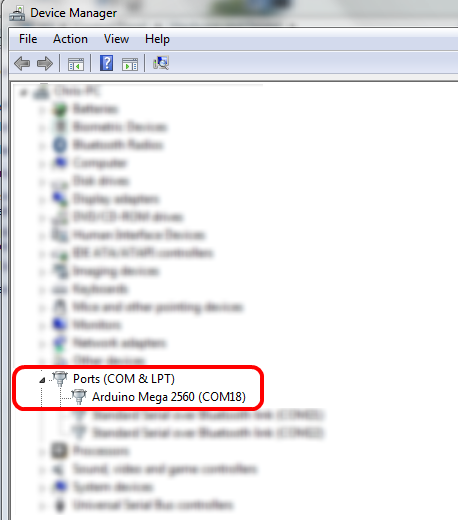
APM should now be recognized and show up in your Windows Device Manger (which you can find in the Windows Control Panel)
|
|
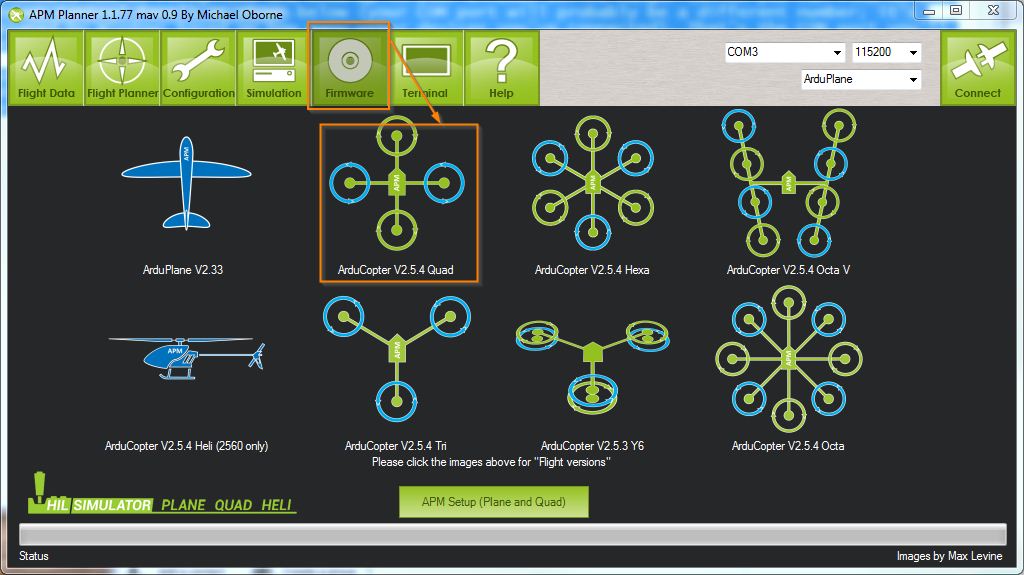
Now you can open the mission planner software, but do not click the connect button, you must first load the correct firmware.
To do this click on the firmware icon as shown, and select the relevant code you want to load. In this case, load the Arducopter Code that is relevant to your frame. When you click on the relevant icon to load the code, a progress bar how the firmware update is progressing, you may also notice many lights flashing on your ardupilot board. Once the firmware has loaded the bar will be completely green. 
|
|
Congratulations, you have now loaded the latest firmware onto your ardupilot mega board. The next guide will show you how to connect everything on arducopter together.